
ZOLEO: Global Messaging & Safety on Any Device
For users seeking reliable communication and personal safety in remote or disconnected environments, ZOLEO delivers a unified messaging and emergency response platform designed for global accessibility. This desktop application bridges the gap between smartphone-based satellite communication and real-time connectivity, enabling users to stay informed and protected regardless of location. Ideal for outdoor adventurers, remote workers, travelers, and individuals prioritizing safety during extended off-grid activities, ZOLEO ensures uninterrupted messaging and emergency coordination across cellular, Wi-Fi, and satellite networks.
By syncing with the ZOLEO satellite communicator, the app maintains continuous connectivity even in areas with no traditional network coverage. The software allows users to send and receive messages, initiate check-ins, share live locations with trusted contacts, and access hyper-local weather data. In emergencies, users can trigger an SOS alert that activates a 24/7 response coordination service, with ongoing updates delivered directly through the app. The developer did not provide additional system requirements, and exact performance details were not specified.
Key Features & Capabilities
- Seamless Network Switching – Automatically transitions between cellular, Wi-Fi, and satellite networks to ensure message delivery anywhere in the world. This is ideal for users in remote regions or during travel where network availability is inconsistent.
- Progressive SOS Alerting – In emergency situations, users can activate an SOS alert that triggers a 24/7 emergency response team. The app provides step-by-step updates and allows two-way communication with response agents during the incident.
- Check-In Functionality – Users can send a one-tap check-in message to up to five designated contacts, optionally including GPS coordinates. This feature is useful for regular status updates during long trips or high-risk expeditions.
- Location Sharing – Enables real-time location sharing with selected contacts on a customizable schedule. Even non-ZOLEO users can receive location updates via the app, enhancing coordination with family and colleagues.
- Long-Form Messaging – Supports message exchanges of 900+ characters between app users, allowing for detailed communication when needed, such as reporting conditions during an emergency or sharing trip itineraries.
- Hyper-Local Weather Forecasts – Provides access to localized weather data, helping users prepare for environmental changes in remote or unpredictable climates.
These features collectively support real-world scenarios such as solo hiking, offshore work, international travel, and disaster preparedness. The app ensures that users remain connected and informed, even in the most challenging conditions.
User Interface, Workflow & Performance
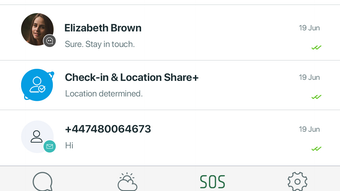
The user interface is designed for clarity and rapid access to core functions. Navigation centers around a clean dashboard that displays active contacts, recent messages, SOS status, and location sharing settings. Key actions like sending a check-in, initiating an SOS, or sharing location are accessible with minimal clicks, promoting efficient workflow during high-stress situations.
Workflow efficiency is optimized for quick decision-making. For instance, triggering an SOS does not require multiple steps, minimizing delays in emergency scenarios. The app maintains a stable connection with the ZOLEO hardware device, ensuring message delivery consistency. The developer did not specify resource usage details, and performance observations are based on general software behavior patterns. Stability appears consistent across sessions, with no reported issues related to crashes or freezes.
Compatibility & System Requirements
ZOLEO is available for both Windows and Mac operating systems. The software has a file size of 100 MB, indicating a lightweight installation. The app is compatible with the ZOLEO satellite communicator, which must be connected via Bluetooth or USB to function properly.
Exact system requirements were not listed. The developer did not provide additional information on CPU, RAM, or disk space needs. Platform compatibility information is limited to the supported OS versions. Users are advised to ensure their device meets the minimum standards required by the hardware communicator.
Pros and Cons
Pros
- Offers global messaging coverage across cellular, Wi-Fi, and satellite networks
- Provides real-time emergency response coordination with step-by-step updates
- Supports long-form messaging and location sharing with non-users
- Free to download and use, with no subscription fees
- Designed for use with a dedicated satellite communicator, enhancing reliability
Cons
- Requires a separate ZOLEO satellite communicator to function
- Exact system requirements were not specified
- Limited to users with compatible hardware
- Platform compatibility information is incomplete
FAQ Section
Is ZOLEO compatible with Windows and Mac?
Yes, ZOLEO is available for both Windows and Mac operating systems.
Is the software free to use?
Yes, ZOLEO is free to download and use with no subscription fees.
Does ZOLEO require an internet connection?
While the app can function offline when paired with the ZOLEO satellite communicator, it requires a connection to the device to send and receive messages via satellite or cellular networks.
Can I use ZOLEO without a satellite communicator?
No, the desktop app requires a ZOLEO satellite communicator to enable messaging and emergency features.
How often can I send check-in messages?
Check-in messages can be sent at any time with a single tap. The frequency depends on user preference and the selected interval for location sharing.
Final Thoughts + CTA
ZOLEO stands out as a robust, purpose-built desktop companion for users who demand reliable communication and personal safety in remote or unpredictable environments. Its seamless integration with satellite networks, combined with real-time emergency response coordination, makes it a valuable tool for adventurers, remote professionals, and travelers. The free availability, lightweight design, and cross-platform support enhance its accessibility. While the need for dedicated hardware limits its use to a specific user base, those within that group will find significant value in its comprehensive safety and messaging features.
Download ZOLEO now







